Live poker hand journal for iPhone

Your best study material isthe hand you just played.

TiltFree makes sure you keep it. Record live hands in a few taps, replay every street, build stats on the regulars you face, and drill the spots you got wrong.

  • Free to start
  • English · 简体 · 繁體
  • No real-money gambling
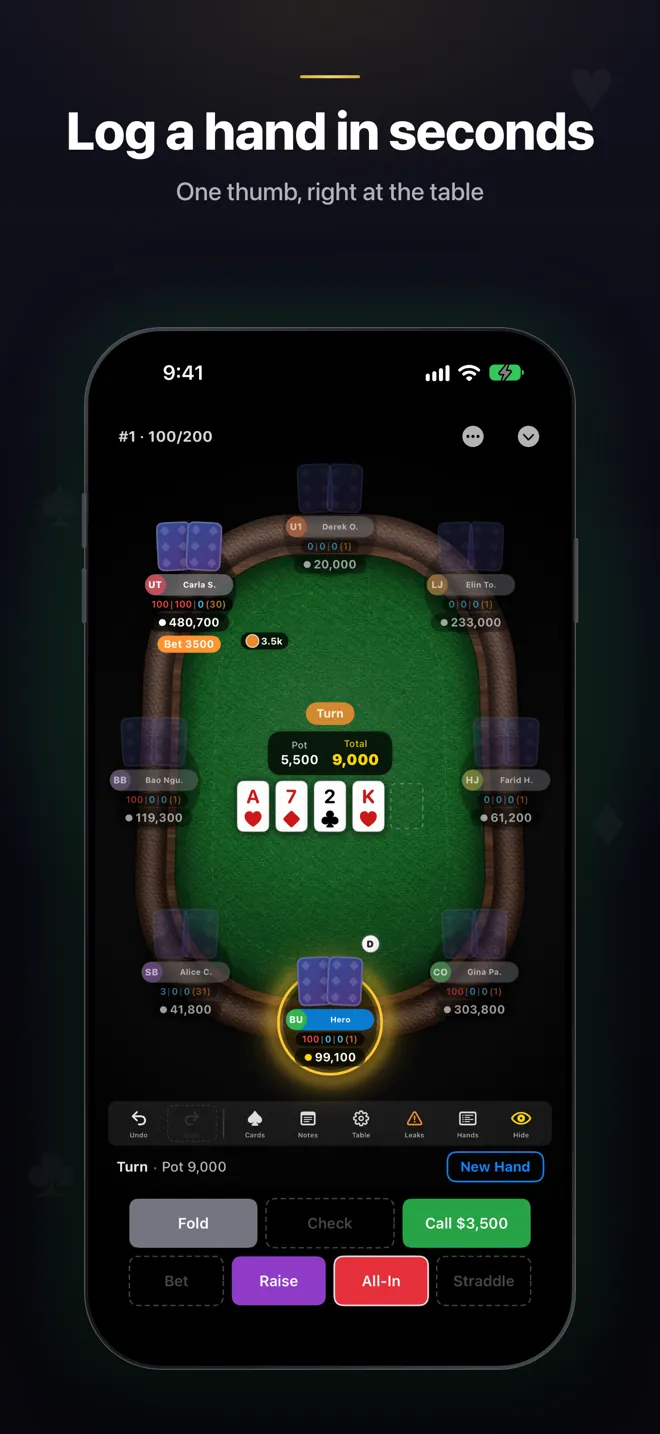
TiltFree recording a hand on the turn: a full table with stacks and bets, and fold, call, raise and all-in buttons along the bottom

One app, from the table to the study session

Why not just use notes? A note says “got rivered again.” TiltFree keeps the seats, stacks, action order and bet sizes, so you can replay the hand exactly as it happened and see where it turned.

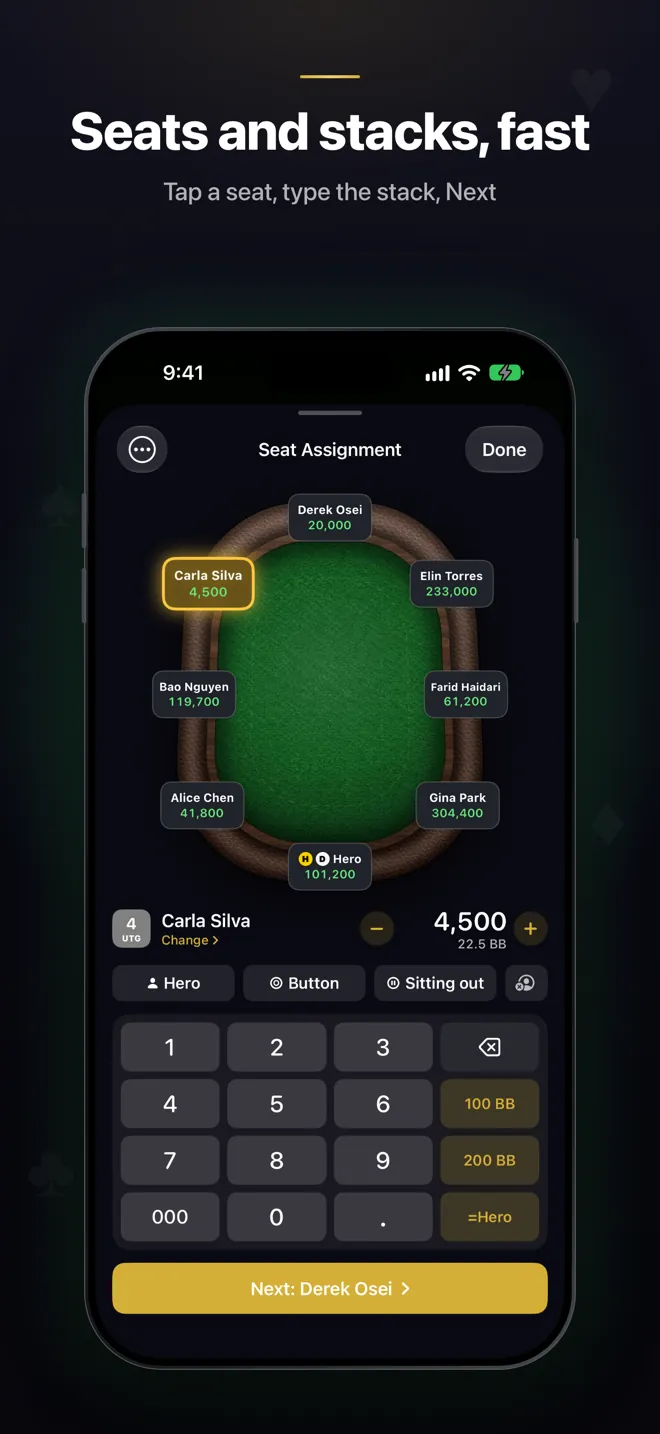
Seat assignment screen: each player’s stack around the table and a built-in number pad with 100 BB, 200 BB and =Hero shortcuts

Record at the table

Log a live hand in a few taps, one-handed

Built for the moment the next hand is being dealt. Nothing covers the table, and every button sits where your thumb already is.

  • Stack number pad with 100bb, 200bb and “same as Hero” shortcuts, plus Next seat — no system keyboard
  • Left, centre or right mode: fold, check, call, bet, raise and all-in dock where your thumb rests
  • Landscape recording keeps every input panel beside the table, and the board picker opens by itself when you need cards
  • Antes, straddles, a third blind and missed-blind posts
  • Jot a note on any hand while it’s fresh
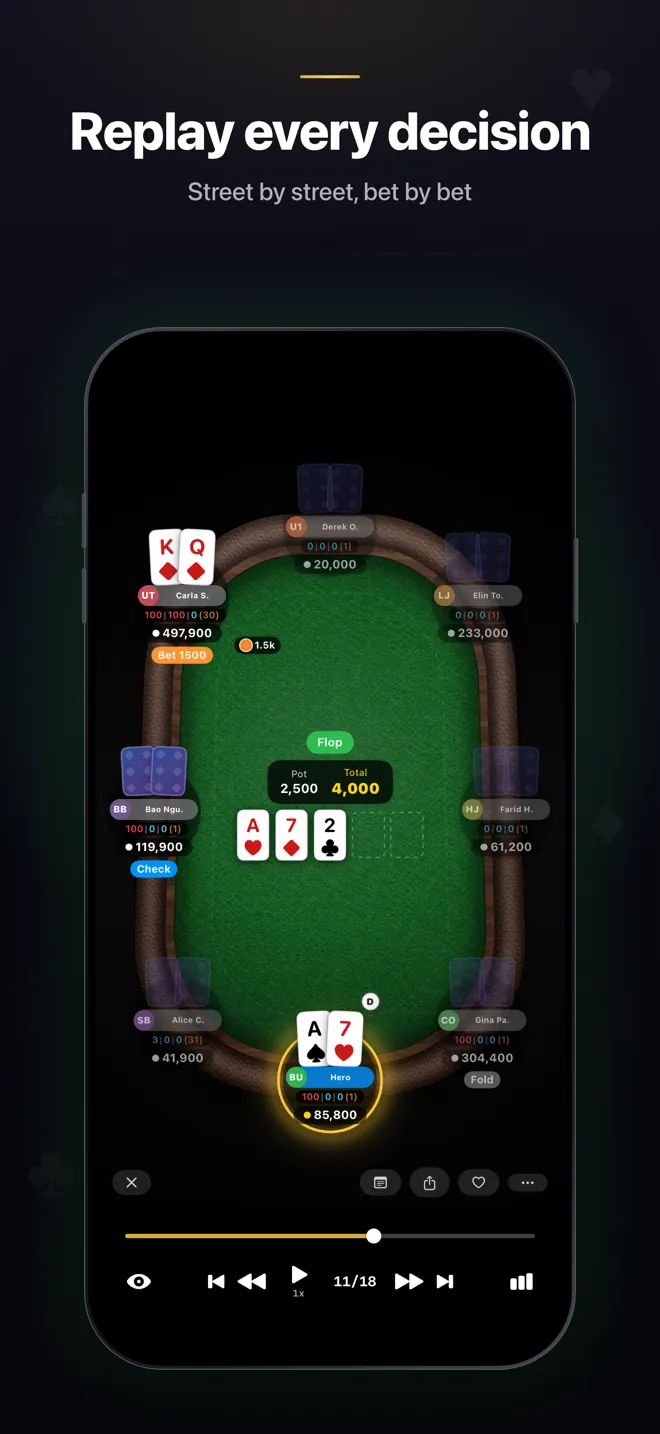
Hand replay on the flop at step 11 of 18, with bets on the table and playback controls
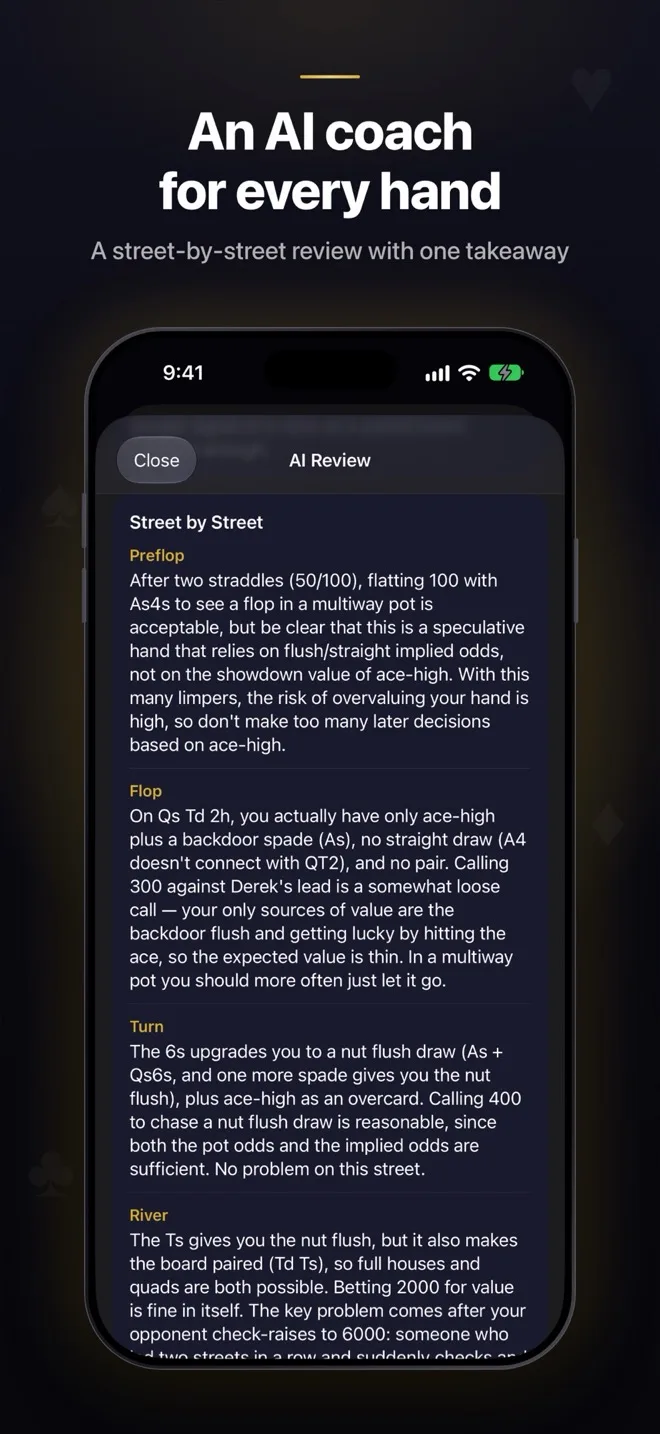
AI review of a hand, street by street: preflop, flop, turn and river notes from the coach

Replay & review

Replay every street. Ask the AI coach for a second opinion.

Step through any hand bet by bet. Each session keeps its hands, notes, opponents and tagged mistakes together, so the drive home turns into a study session.

  • Street-by-street replay with a scrubber
  • The AI coach reads the hand with your stats, your notes and the villain’s file, then gives you one takeaway
  • Ask for a review of a whole session, and see the coach’s read on your overall play in My Game
  • Share any hand as an image
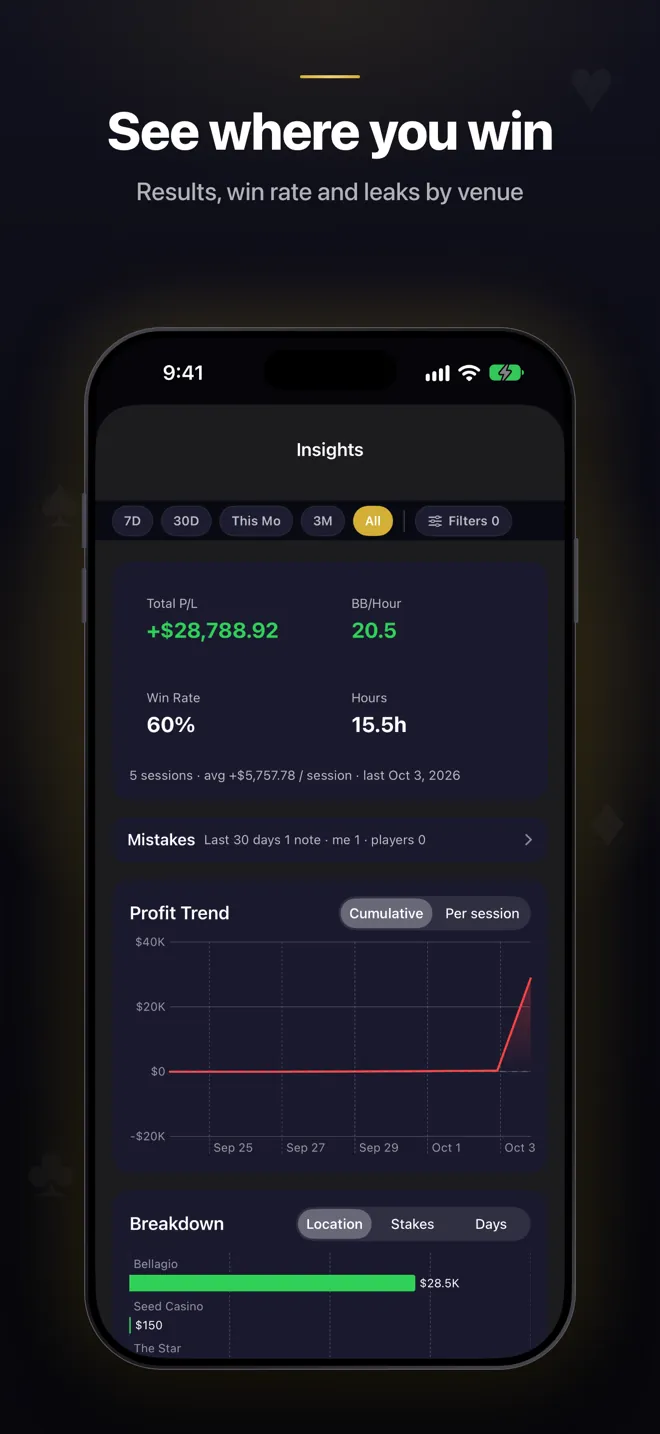
Insights screen: total profit, BB per hour, win rate and hours, a profit trend chart and a breakdown by location

Know your table

Stats on the regulars, built from your own hands

Live tables don’t come with a HUD. Record hands and TiltFree builds the numbers on the people you actually play against — and on your own results.

  • Opponent profiles with exploit notes, style labels and an optional photo
  • VPIP, PFR, 3-bet and c-bet from the hands you record
  • Session results: profit trend, win rate, BB per hour, by stakes, venue and day
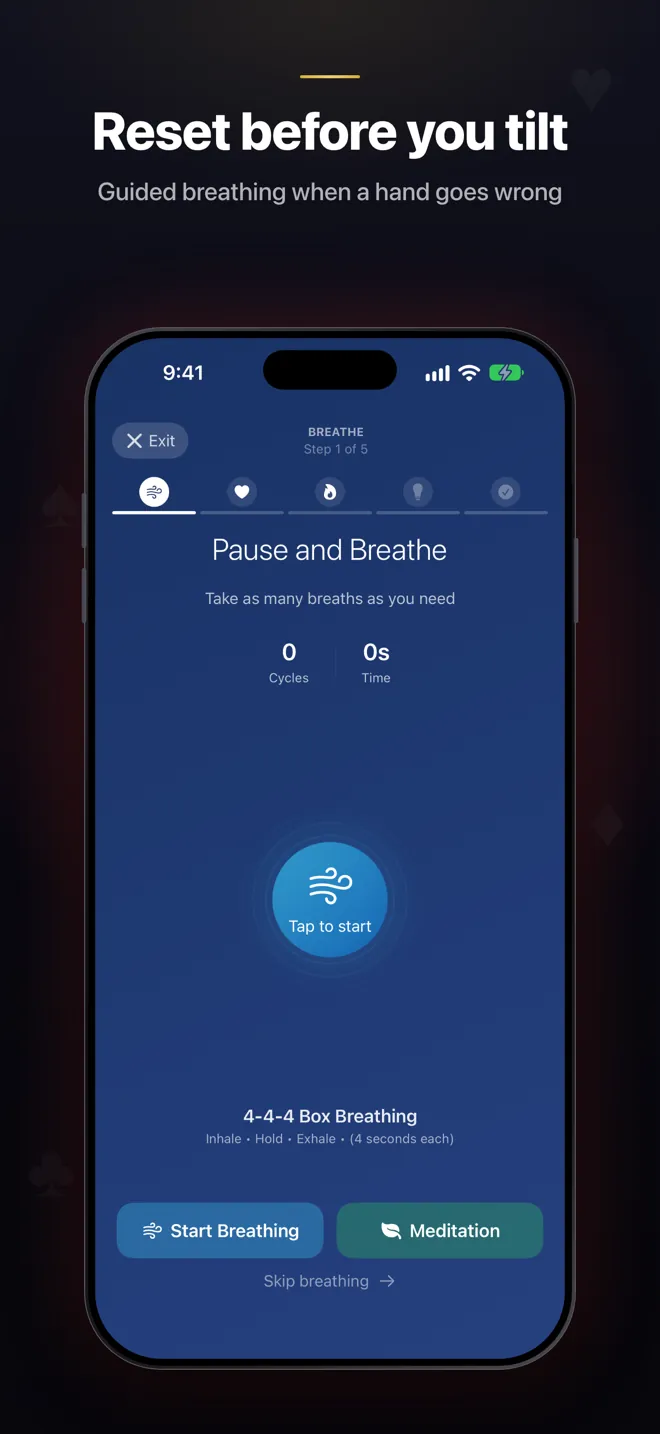
  • See how mood and tilt line up with your results
  • Import past sessions from a CSV export
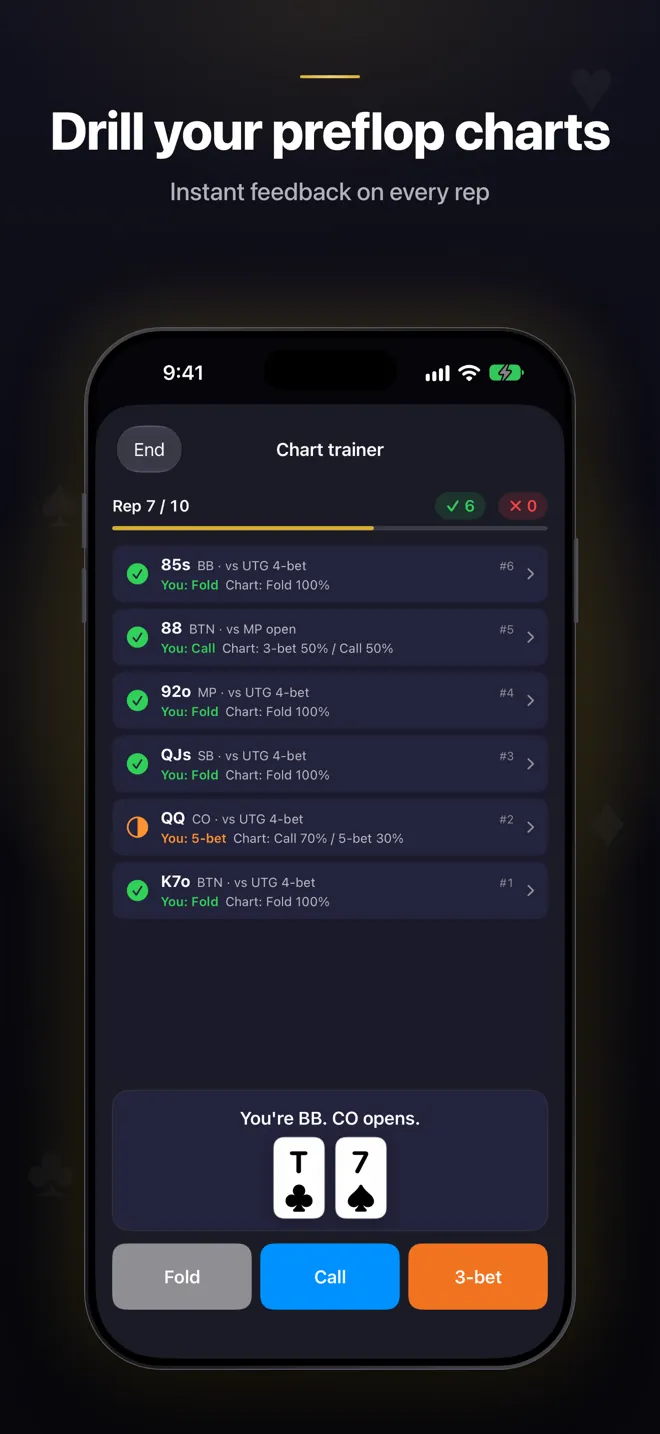
Chart trainer on rep 7 of 10: answered spots marked right or wrong against the chart, and Fold, Call and 3-bet buttons for the next hand
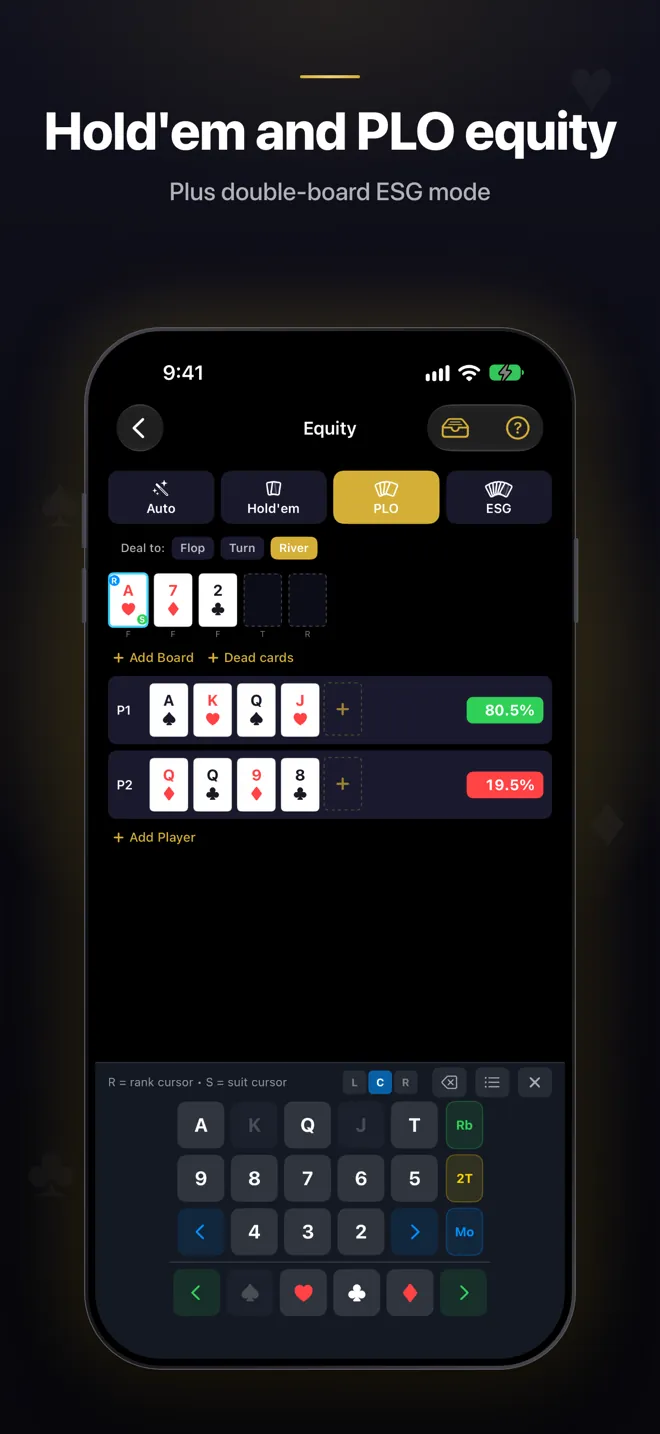
Equity calculator in PLO mode: two four-card hands on a three-card board, 80.5% against 19.5%

Train between sessions

Drill the spots you got wrong

Preflop practice that moves as fast as you think, and an equity calculator that’s free and unlimited.

  • Chart trainer: one tap per question, instant feedback, tap any result to open its chart
  • The thinking.poker 6-max charts are built in — or build and import your own packs
  • Whole-hand drills against AI opponents (TAG, LAG, nit, calling station, maniac), graded against your chart
  • Equity for Hold’em (cards or ranges), PLO and ESG, with up to three boards

How it works

Three steps that turn a session into something you can learn from.

  1. Record at the table

    Seats, stacks and action in a few taps between hands. Add a note while it’s fresh.

  2. Replay and review

    Replay the big pots street by street on the way home, and ask the AI coach what it sees.

  3. Drill the leak

    Turn what you found into chart-trainer reps and drills, so it’s fixed before your next session.

Free to start. Pro when you’re ready.

The free plan is meant to be used, not a trial.

Free

Everything you need to start a hand journal.

$0to download and use

  • 30 recorded hands a day
  • 50 practice reps a day (drills and chart trainer combined)
  • 1 custom chart pack
  • 3 saved equity scenarios
  • Full equity calculator — Hold’em, PLO and ESG
  • Learning library and mental-game tools
  • 3 free AI hand reviews, plus 1 more for every 25 hands you record

Pro

Monthly or yearly

Monthly or yearly, for players who record every session.

$9.99a month

or $59.99 a year, with the same 20 AI reviews a month

  • No daily limits on recorded hands or practice reps
  • Unlimited custom chart packs
  • Unlimited saved equity scenarios
  • 20 AI hand reviews every month
  • Everything in Free
Download on theApp Store

Need more reviews? Packs of 20 AI reviews ($9.99) and 100 ($34.99) are sold in the app. These are US App Store prices; your local price and any trial are shown in the App Store before you subscribe. Subscriptions renew automatically unless cancelled at least 24 hours before the end of the period.

Questions, answered

Is TiltFree free?

Yes. TiltFree is free to download, and the free plan is meant to be used: 30 recorded hands a day, 50 practice reps a day, the full equity calculator, the learning library and the mental-game tools, plus 3 free AI hand reviews. Pro is $9.99 a month or $59.99 a year in the US, removes the daily limits and includes 20 AI hand reviews a month.

Can I use it at the table? Does it work offline?

It’s built for the table: action buttons that dock left, centre or right under your thumb, a stack number pad that doesn’t cover the table, and landscape recording. Hands are saved on your phone as you record them, so a weak casino signal won’t cost you a hand. AI reviews and account sync need a connection.

What does the AI hand review do?

The AI coach reads the hand as you recorded it — seats, stacks, action order and bet sizes — together with your stats, your notes and the villain’s file, and talks through each street before ending with one takeaway. You can also ask for a review of a whole session, and see the coach’s read on your overall game in My Game. It’s a second opinion to study with, not a solver, and it’s only as good as the hand you recorded.

How many AI reviews do I get?

Free accounts start with 3 AI hand reviews and earn 1 more for every 25 hands recorded. Every Pro plan, monthly or yearly, includes 20 AI hand reviews a month. If you need more, packs of 20 ($9.99) and 100 ($34.99) can be bought in the app.

Which games does it support?

Hand recording, opponent stats and the chart trainer are built around live No-Limit Hold’em, including antes, straddles, a third blind and missed-blind posts. The equity calculator covers Hold’em (specific cards or ranges), Pot-Limit Omaha (PLO) and ESG, with up to three boards for double-board and bomb-pot spots.

Is TiltFree available in Chinese?

Yes. The whole app is available in English, Simplified Chinese and Traditional Chinese, and guided meditations come in natural English and Chinese voices. This site is also available in 简体中文 and 繁體中文.

Is my data private?

Your hands and sessions are saved on your device first, and cloud sync is optional. We don’t sell your data. Each account’s data stays separate, and if you started as a guest you decide whether to merge it when you sign in. The privacy policy has the details.

Is TiltFree a gambling app?

No. TiltFree is a tracking and study tool. There is no real-money gambling, no wagering and nothing to cash out — you record and study hands you played elsewhere.

Built by live players, for live players

“I played 500+ hours of live 10/20, and the hands that mattered most were a blur by the drive home. TiltFree started as the notebook I wanted: fast enough to use between hands, detailed enough to replay the next morning.”

Made by the thinking.poker team. Every feature has to help you remember, review or practice a hand you really played.

— Lei, thinking.poker

Keep the next hand.Start your hand journal free.

Record your next session, replay the big pots on the way home, and drill what you find.

Download on theApp Store

Free to download on iPhone. A sample session is ready to explore the moment you open it.